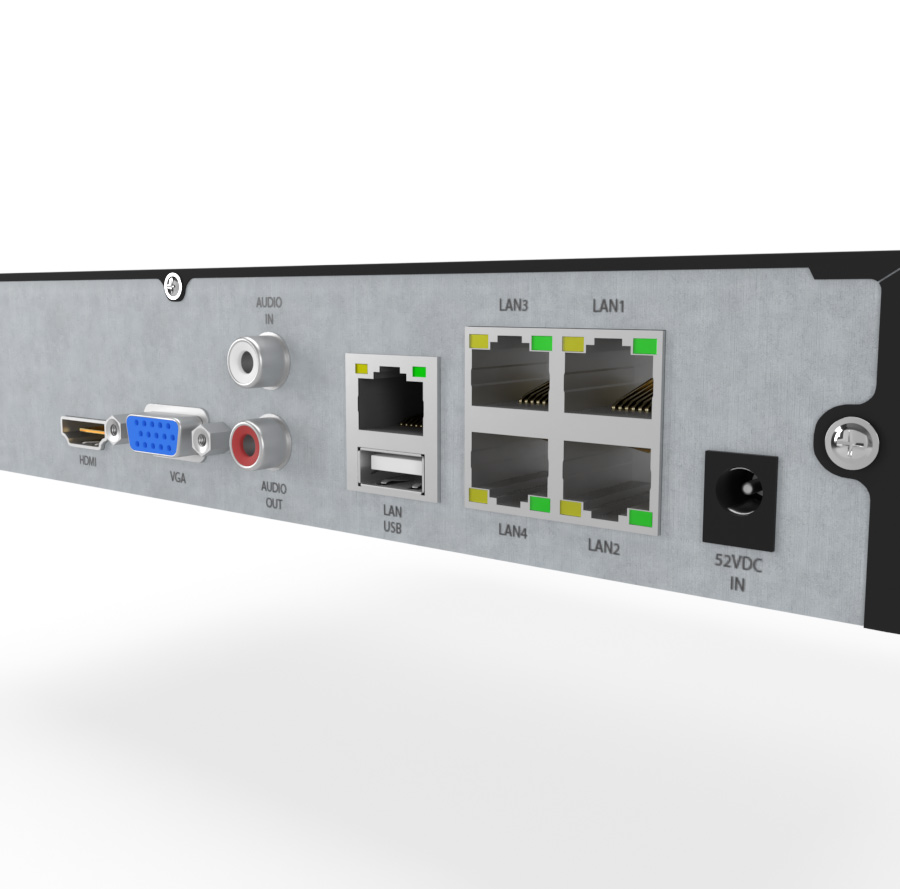
Connecting a recorder to a monitor or TV can be easy if you follow these steps.
Required equipment
- The recorder
- A monitor or TV
- An HDMI or VGA cable
- An adapter, if the device and monitor/TV have different connectors
Connection procedure
Connection via HDMI cable
- Check the ports — make sure both the recorder and the monitor/TV have HDMI ports.
- Connect the cable — plug one end of the HDMI cable into the HDMI output on the recorder. Plug the other end into the HDMI input on the monitor or TV.
- Set the input on the monitor/TV — switch on the monitor or TV. Use the remote or buttons to switch the input to HDMI (usually labelled HDMI1, HDMI2, etc., depending on which port you used).
- Switch on the recorder — the image should appear automatically on the monitor or TV.
Connection via VGA cable
- Check the ports — make sure both the recorder and the monitor/TV have VGA ports. Note: VGA does not carry audio, so you'll need a separate audio cable.
- Connect the cable — plug one end of the VGA cable into the VGA output on the recorder. Plug the other end into the VGA input on the monitor or TV.
- Connect the audio cable (optional) — if you also want audio, connect an audio cable (e.g. 3.5 mm jack) from the recorder to the audio input on the monitor or external speakers.
- Set the input on the monitor/TV — switch on the monitor or TV and switch the input to VGA.
- Switch on the recorder — the image should appear automatically on the monitor or TV.
Tips
- Prefer HDMI over VGA — it carries both image and audio and usually provides better picture quality.
- If you use VGA and need audio too, don't forget the separate audio cable.
- Make sure all cables are firmly connected to avoid bad signal or image dropouts.
By following these steps you should be able to connect your recorder to a monitor or TV via HDMI or VGA.
Important warning
Customers often plug HDMI or VGA outputs from recorders or cameras into the same-named connectors on their notebooks or PCs, thinking they are inputs. This can cause irreparable damage to both devices, which is not covered by warranty. Connect only to monitors and TVs!
Most common mistakes
After connecting the recorder to a monitor I only see the startup logo (or nothing)