Adding a PATRONUM IP camera to LOXONE
IP cameras are added as a user-defined intercom.
- Add a new user-defined intercom in the relevant menu.
- Fill in the intercom name and place it in the desired category.
- Video stream URL (internal): http://camera-ip/snap.jpg
- Video stream URL (external): https://remoteConnect/snap.jpg
- Camera username: admin (default)
- Camera password: 123456 (default)
- Save the configuration and upload it to the Mini Server.
The LOXONE setup guide is available here.
Adding a POE NVR recorder to LOXONE
All new POE NVR recorders and selected older models — after firmware update — now support sharing JPEG streams from cameras connected directly to PoE ports as well. This is a special feature developed for LOXONE integration.
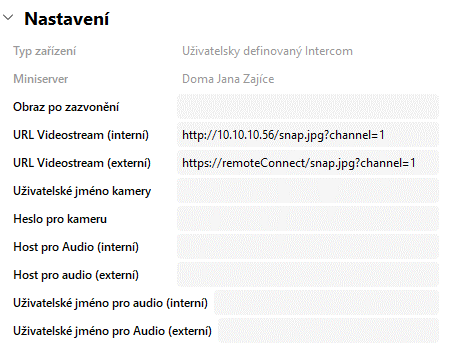
The procedure is the same as for an IP camera; only the stream URL format differs:
- Video stream URL (internal): http://nvr-ip:httpport/snap.jpg?channel=1
- Video stream URL (external): https://remoteConnect/snap.jpg?channel=1
The number at the end of the URL represents the channel on the NVR.
Note: The recorder must be set for local display on a TV/monitor on the home screen (camera preview). If the on-screen wizard or a menu is open, the JPEG files won't be created.