Adding a microphone to the camera system
How and where is the microphone connected?
The microphone has a line amplifier, so the audio signal can be connected to any recorder or IP camera with an AUDIO IN connector. Because of the amplifier, the microphone needs to be powered — typically 12 V DC. Power can be supplied separately, or — if the microphone is mounted near the camera — via a loop that takes power directly from the camera, as shown in the diagram below. The audio signal is transmitted like the video — via coaxial cable, ideally a multi-cable. Connection is made with CINCH connectors at both ends. The signal cable is then plugged into the AUDIO IN input on the back of the device.
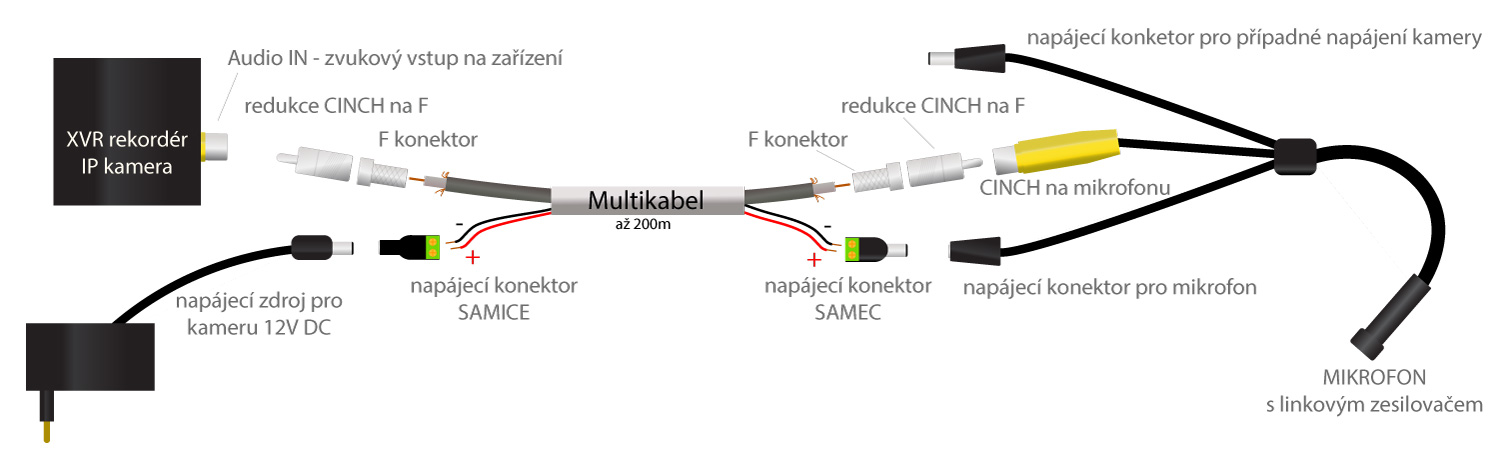
What will I need?
For mounting the microphone next to the camera:
- Indoor microphone with amplifier — ambient NK-MIC01
- Coaxial cable — length as needed
- F connector 5 mm — 2 pcs per microphone
- CINCH-to-F adapter — 2 pcs per microphone
For mounting the microphone away from the camera:
- Indoor microphone with amplifier — ambient NK-MIC01
- Multi-cable — length as needed
- F connector 5 mm — 2 pcs per microphone
- CINCH-to-F adapter — 2 pcs per microphone
- Power connector with terminal block, MALE — 1 pc per microphone
- Power connector with terminal block, FEMALE — 1 pc per microphone
- PATRONUM 1000 mA, 12 V DC PSU — or one free connector on the camera distribution
How to enable audio in the device?
By default the audio input is muted on every device. You need to enable the audio input as shown in the video below.